
On this page
Capture Options
Capture options control what gets saved and how. You can set them per capture in the Quick Capture form, or define defaults for Quick URL captures in Settings → Capture.
Options in the Quick Capture form
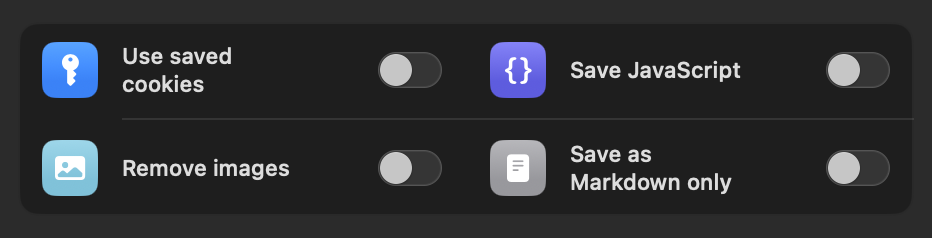
| Option | What it does |
|---|---|
| Use saved cookies | Reuses cookies from the in-app browser, for pages behind logins or consent walls. See Logins & Cookies. |
| Open all Reddit comments | For Reddit threads: expands collapsed comments and loads "more replies" before saving. The option only appears when the URL is a Reddit link. |
| Save JavaScript | Keeps the page's scripts inside the archive (larger file). Saved archives stay static unless you enable the per-item JavaScript toggle when viewing. |
| Remove images | Skips images, with a size threshold slider to keep small ones (see below). |
| Save as Markdown only | Converts the article to a Markdown file instead of an HTML archive. |
Your choice for Save JavaScript is remembered for the next capture. The defaults for Quick URL and shared links live in Settings → Capture. The full pane is documented in the Settings Reference.
JavaScript & compatibility improvements
Some modern sites only reveal their content while scrolling: text and images fade in through animation frameworks, and a plain snapshot would save them invisible. The setting "JavaScript & compatibility improvements for animations" (Settings → Capture) fixes this:
- During capture the app scrolls through the page and replays scroll-triggered animations so hidden content is revealed before the snapshot is taken.
- The page's scripts are kept in the archive, so compatible pages can also be viewed with their dynamic behavior later.
Independent of this setting, WebsiteArchiver always runs a light-weight check for invisible animation content and repairs the snapshot's styling so nothing stays hidden.
If a saved page looks empty or half-empty, re-capture it with this setting enabled. That solves the vast majority of "blank archive" cases. More in the FAQ.
Images & Markdown
Two options make archives dramatically smaller: Remove images (with a size-threshold slider that keeps icons and small illustrations) and Save as Markdown only (pure text instead of an HTML archive). Both work at capture time and on existing items. They have their own page with all the details.
Related: in Settings → Capture → Image Storage you choose whether kept images are stored as separate files in their original format next to the archive (the default) or embedded into one HTML file: maximally portable, everything in a single file.
Archive format & compression
Compression (Settings → Capture) packs archives with built-in compression, typically cutting file size in half. It's on by default. Compressed archives are still ordinary, self-contained HTML files: they unpack themselves when opened, in WebsiteArchiver or in any browser.
Reddit: open all comments
Reddit collapses most of a discussion behind "more replies" buttons. With this option the capture engine clicks through the thread and expands the comment tree before saving, so the archive contains the whole discussion, not just the first screen. For one-click captures it's enabled by default; the switch lives in Settings → Capture.
Desktop layout on iPhone iOS
Settings → Capture → Page Layout: by default the iPhone saves pages in their desktop layout, matching what the Mac app produces. Turn it off to archive the mobile version of pages instead. iPad always captures the desktop layout.