
Extensions & Automation
The fastest capture is the one you don't have to leave your browser for. WebsiteArchiver hooks into Safari on the Mac, the share sheet on iOS, and offers a URL scheme for everything else.
Safari extension macOS
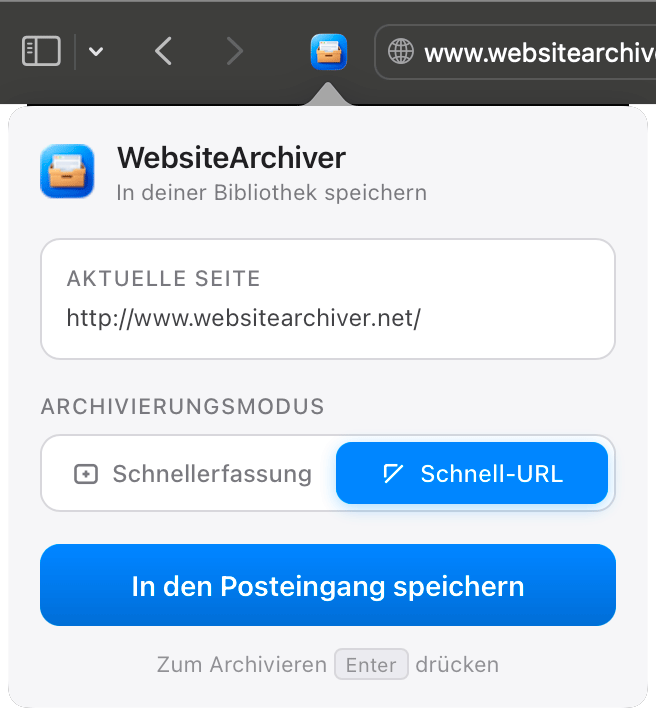
The extension adds an Archive this page button to Safari:
- The toolbar popup archives the page you're on. A mode switch decides whether it opens the Quick Capture form (title, tags, options) or saves directly to the Inbox.
- Right-click anywhere on a page → Archive this page in the context menu.
Enable it once: WebsiteArchiver → Settings → Advanced → Open Safari Extension Settings, then tick WebsiteArchiver in Safari's extension list.
Share sheet iOS
On iPhone and iPad, WebsiteArchiver appears in the system share sheet. Share any page from Safari (or a link from any app), and it's handed to the archive with a short confirmation.
By default, shared links are captured straight into the Inbox the next time you open the app. Prefer to add tags first? Turn on Settings → Capture → Shared links open Quick Capture and the capture form opens instead.
URL scheme & automation
WebsiteArchiver answers to the websitearchiver:// URL scheme, the hook for Shortcuts, launchers (Raycast, Alfred) and scripts:
| URL | Effect |
|---|---|
websitearchiver://capture?url=<URL>&mode=quickcapture | Opens the Quick Capture form pre-filled with the URL |
websitearchiver://capture?url=<URL>&mode=quickurl | Captures the URL straight to the Inbox with your default options |
The url parameter must be URL-encoded. Example: archive the current Safari tab from a shell script:
open "websitearchiver://capture?url=https%3A%2F%2Fexample.com&mode=quickurl"