
On this page
Search & Sorting
WebsiteArchiver indexes the complete text of every archived page, so search can cover not just titles, but everything you ever saved. Two switches control how far a search reaches.
Full-text search
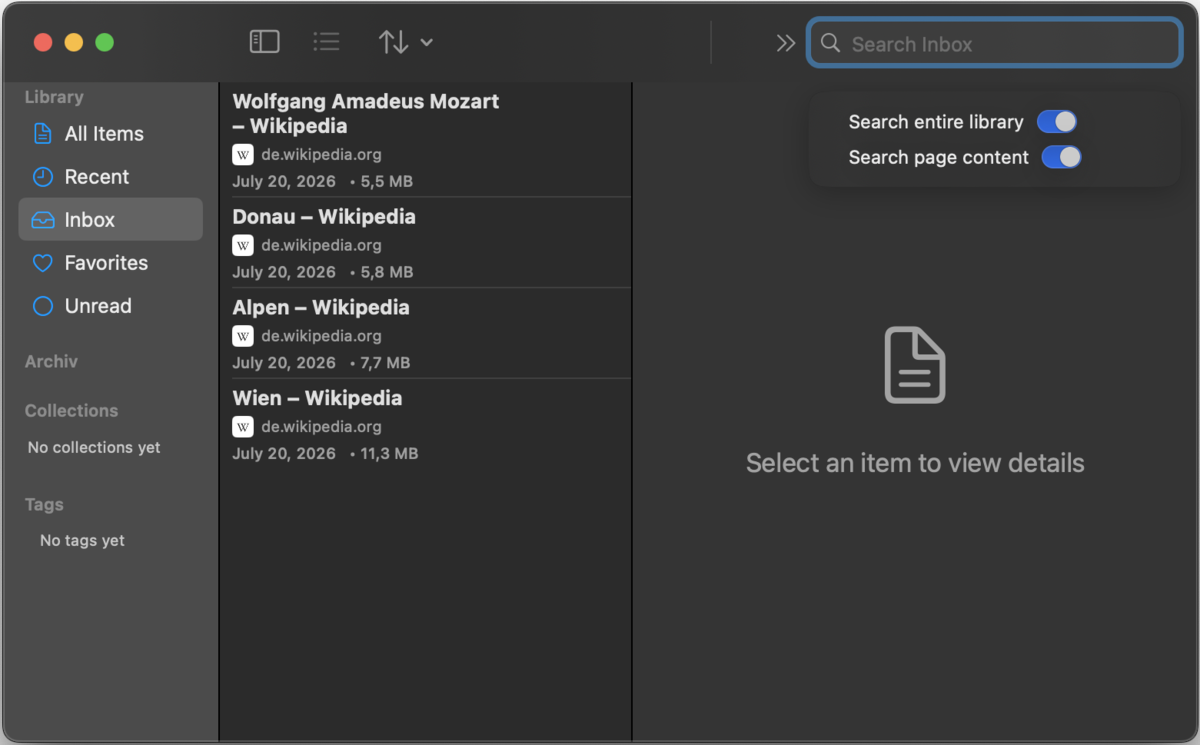
Type into the search field: macOS in the toolbar (or press /), iOS the magnifier in the bottom bar. Out of the box, search looks through the view you're in (the selected folder, collection or filter) and matches titles, domains and tags.
Two switches in the search field's menu widen the net:
- Search entire library: search everything, no matter which folder or filter is currently selected.
- Search page content: also match the full body text of the archived pages, powered by the search index.
The search works completely offline: it's your archive, on your disk, so even pages that vanished from the web years ago remain searchable.
Sorting
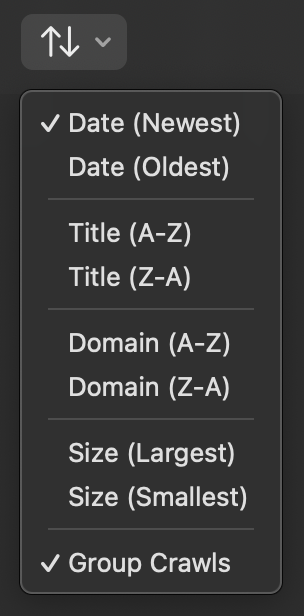
The sort menu (toolbar on macOS, bottom bar on iOS) orders the list by:
- Date: newest or oldest first
- Title: A→Z or Z→A
- Domain: A→Z or Z→A
- Size: largest or smallest first
The menu also holds the Group Crawls toggle: on, pages from one crawl collapse into a single group row; off, every page stands on its own (see Website Crawler).
The search index
The index lives next to your library and updates automatically as you capture, edit and delete. If search results ever seem out of step with your library (for example after restoring an old backup), rebuild it with one click: Settings → Storage → Rebuild Index. The same section shows how many items are currently indexed.